
Recently, we published the first of a two-part series on how to audit your Facebook advertising efforts, from an account perspective all the way down to an individual ad level.
Part one was a look at the classic baseline audit. This is what most agencies will perform and is a good foundation on which to base your own in-house audit too, but in part two we’re going to show how you can get a more comprehensive look at how an account operates as a whole.
This follow-up will take a deeper dive into some overlooked areas, preparing you to have a superior understanding of your successes and shortcomings, and how to capitalize on the former and improve the latter.
Here’s a look at each component, and what to hone in on within those:
Timeline audit
When doing an audit of your timeline, it starts with seeing how long campaigns were running.
What we’re looking for here is making sure:
- Have campaigns run too long without any adjustments?
- Or were they too short to have conclusive data?
In the case of the first one, in practice that would look like a campaign that’s gone longer than 30 to 60 days without an adjustment to ads, audiences, or other variables.
In the latter’s case, you obviously need a large enough sample size to have statistically significant data — ideally, we’ve found tests should run no shorter than two weeks, or $1,000.
On that note, a handy tool to that end is Survey Monkey’s statistical significance calculator. We recommend it for visualizing how much weight to put on your findings.
Audience manager audit
In part one, we discussed auditing the audiences used in your ad sets — but that’s only the tip of the iceberg.
In audience manager, you can also audit the full list of audiences like:
- Saved
- Custom
- Lookalike
- Third party — for example, Hubspot integrations
We always recommend this audit because there may be audiences in audience manager that aren’t currently being utilized in the campaigns themselves. Now, this could very well be intentional on your part — which is totally reasonable! — but it’s always a good idea to see which different audiences are available and make sure you’re not neglecting any that could be useful. Basically: Are there any audience-based opportunities out there that you’re not taking advantage of?
Here are some example areas in which you can find new opportunities.
Custom audiences (retargeting)
Do you have all of the following? (Or variations on these?)
- Website visitors — either all or for certain pages, which you can look up to 180 days
- Facebook accounts engaged — up to one year
- Instagram accounts engaged — up to one year
- Video views
- Cart abandoners
This isn’t comprehensive either, and there’s many more areas you can explore.
Saved audiences
Do you have multiple saved audiences with variations in interests, geographies, etc.? Obviously they need to all still be relevant within these variations, but if you’re only ever using the exact same audience, you’re pretty much guaranteed to have blind spots on which you’re missing out.
Lookalike audiences
For all your custom audiences, you can create lookalikes to increase your overall audience without sacrificing relevance. What steps have you taken to that end?
Tracking audit
Before starting here, we should mention: About two years ago Meta transitioned all tracking pixels into datasets to accommodate for their two different types of events — below (and in general) we use the terms “pixel” and “dataset” interchangeably.
Anyways: A tracking audit is a critical step — it makes sure you’re allowing for Meta to properly route data back to the platform for effective conversion campaigns and retargeting. Although we wouldn’t rely exclusively on data that happens off-platform — for example leads and cost per lead — it’s still critical to audit the tracking setup so you’re sure that’s functioning well.
First thing when doing a tracking audit: Whether or not there’s a dataset (or pixel, again) you have access to, you need to see what pixel(s) are on the site.
To that end, download the Meta Pixel Helper Chrome plugin, which will show you which pixel or pixels are on a site.
Once you have that, you can see: Does the site have a Meta pixel (or multiple)? Does the ID number match what you have access to?
Regarding your site, having multiple pixels on it isn’t necessarily a bad thing, but in most cases we would recommend sticking to only one.
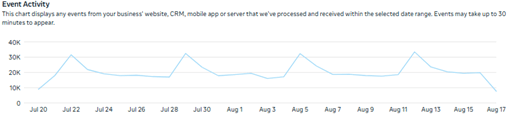
As an example: Let’s say it’s a “perfect world” scenario where you check the pixel helper, find there is one on the site, and have access to it in the events manager. Great! Everything’s now set up for your next steps: ensuring data is coming through the event activity. If your site shows zero event activity or has a significant amount of variability, that’s a red flag and should be investigated further.
In the past, events used to work by manually setting up event triggers via the pixel itself. Now with the Google Tag Manager, there’s a special code you incorporate when setting up a trigger that routes back to the dataset.
That code looks like this:
<script>
fbq(‘track’, ‘Lead’, {
content_name: ‘Event Form’,
lead_type: ‘event’
});
</script>
<noscript>
<img height=”1″ width=”1″ style=”display:none”
src=”https://www.facebook.com/tr?id=504185165529017&ev=Lead&noscript=1″ />
</noscript>
After you’ve confirmed your event activity is looking good, go to the diagnostics tab. There you’ll see if there are any active errors previously detected or ignored.
Lastly, in settings it’s a good idea to look through all the following sections, just to ensure nothing jumps out at you as being off:
- Linking — for apps only
- Sharing — to confirm it’s connected to your ad account
- Manage data source categories
- Data restrictions
- Website settings
- Automatic advanced matching — turn on if desired, when working with clients we turn it off unless they approve
- Event setup — for testing events
- Conversions API
- Extend attribution uploads
- Allow historical conversion uploads
- In-store transactions
Traffic permissions — we usually take a moment with either an allow or block list given there are some weird domains out there, so this is worth a few minutes of review
Automatic event logging for the Facebook SDK (software development kit)
Commerce manager audit
This is for you if you’re an ecommerce business or, more broadly, anything with a feed.
When running a commerce manager audit, you’ll want to check:
- Your connection to Shopify (or your ecommerce platform of choice, if different)
- Your catalog(s) is active
- Your shop setup is active
- Collections and list
All of these are to ensure everything’s all set up and that you haven’t accidentally neglected anything. You might also find there are opportunities for new lists that match a campaign — for example, on-sale items, winter long-sleeves, etc. — so if that’s the case, now’s a good time to highlight those.
Access audit
Lastly is the access audit.
This is a really quick, simple step, but one that shouldn’t be overlooked! It’s literally just double-checking who has access to, for example, your Facebook page, your ad account, your Business Manager portfolio, etc. You might find there are some old team members with access, or an agency that once assisted you.
For obvious reasons, you want to make sure no one has access to any of your accounts who shouldn’t! Sure, it’s unlikely they’ll do anything crazy, but every once in a while you’ll hear of a disgruntled former team member or someone taking over a social media account or something else and doing some damage. We obviously want to avoid that.
After completing all these steps, you’ll know you’ve left no stone unturned!
At the start, it might feel overwhelming looking it over all at once but, when you take it step-by-step, you’ll soon realize it’s not as daunting as it might appear on paper. Most importantly, by properly conducting a comprehensive audit, you’ll know there are no mystery factors afoot when beginning your future campaigns, and can rest assured you’ll be starting off strong!